
Introducing SimpleDraw Plus
All our premium features, wrapped in a single, affordable package...

Diarmid Mackenzie
SimpleDraw Developer
Introducing SimpleDraw Plus
It’s been quite a few months since I’ve posted on this blog. The main reason is that I’ve been heavily focussed on developing new features for SimpleDraw, leaving little time for writing.
Over the past few months we’ve shipped three major features. Today we’re bringing them together as SimpleDraw Plus — priced at just $10 for a year’s access.
Cloud Storage and Image Tracing
At the end of December, we launched our first paid feature, Cloud Storage. This offers a much more convenient way to manage and keep track of multiple drawings, with built-in version history for every drawing, and private sharing capabilities. If you have been actively managing multiple timestamped save files in your Downloads folder, it’s a massive improvement in terms of clarity , organization and convenience.
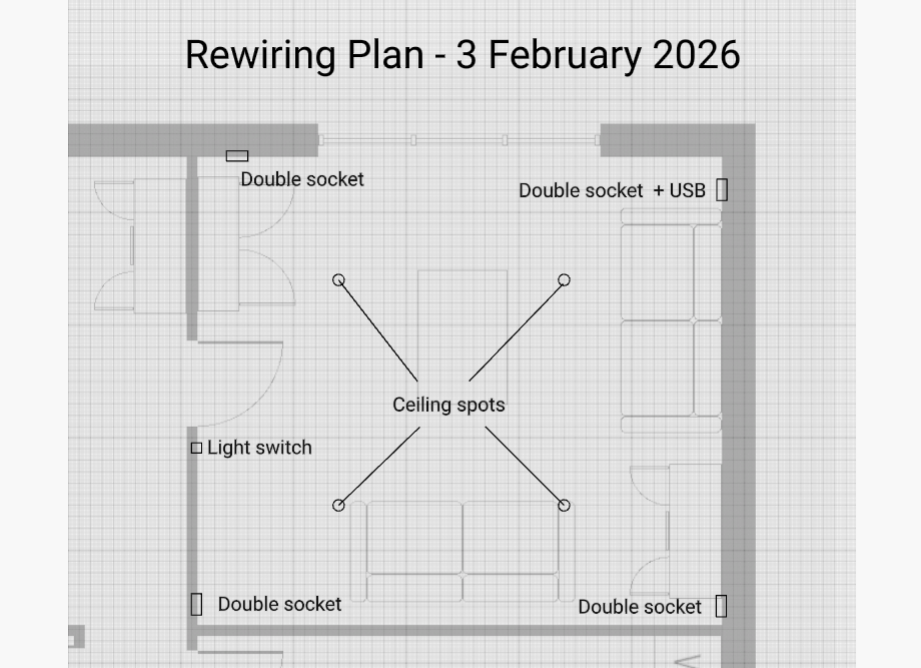
In February, we added Image Tracing. You can upload an existing image, set it to the background of your drawing, and then draw over it. If you have an existing floor plan drawing, whether it’s from an architect’s drawing, a planning or zoning application, or a real-estate brochure, you can trace over that to create the same floor plan in SimpleDraw, or you can draw over the top of it with annotations of specific details for your project - for example the new layout for your electrics in a room you are refurbishing.
 |
|---|
| * Details for an electrical layout, drawn over a background image of a floor plan * |
It’s never been easier to recreate an existing floor plan or technical drawing in SimpleDraw. There’s no need to carefully measure and copy - you can just upload the image, set the right scale, and then trace directly over your existing drawing.
3D & VR Walkthoughs
Finally, last week, we launched one of the features that I’m most excited about - the ability to view and walk through SimpleDraw floor plans in 3D and in VR.
As a software developer, I’ve done a lot of work in VR, and during our most recent renovation project at home, I created 3D models of several rooms. This meant that we could immerse ourselves in our designs, before we made them a reality, and it was amazingly helpful in terms of identifying issues or changes we wanted to make. The difference between imagining being in a room based on a floor plan, and being immersed in a VR recreation of that room is simply vast. It really enables you to sense what the space will feel like, and spot issues you’d never notice just by looking at a floor plan.
 |
|---|
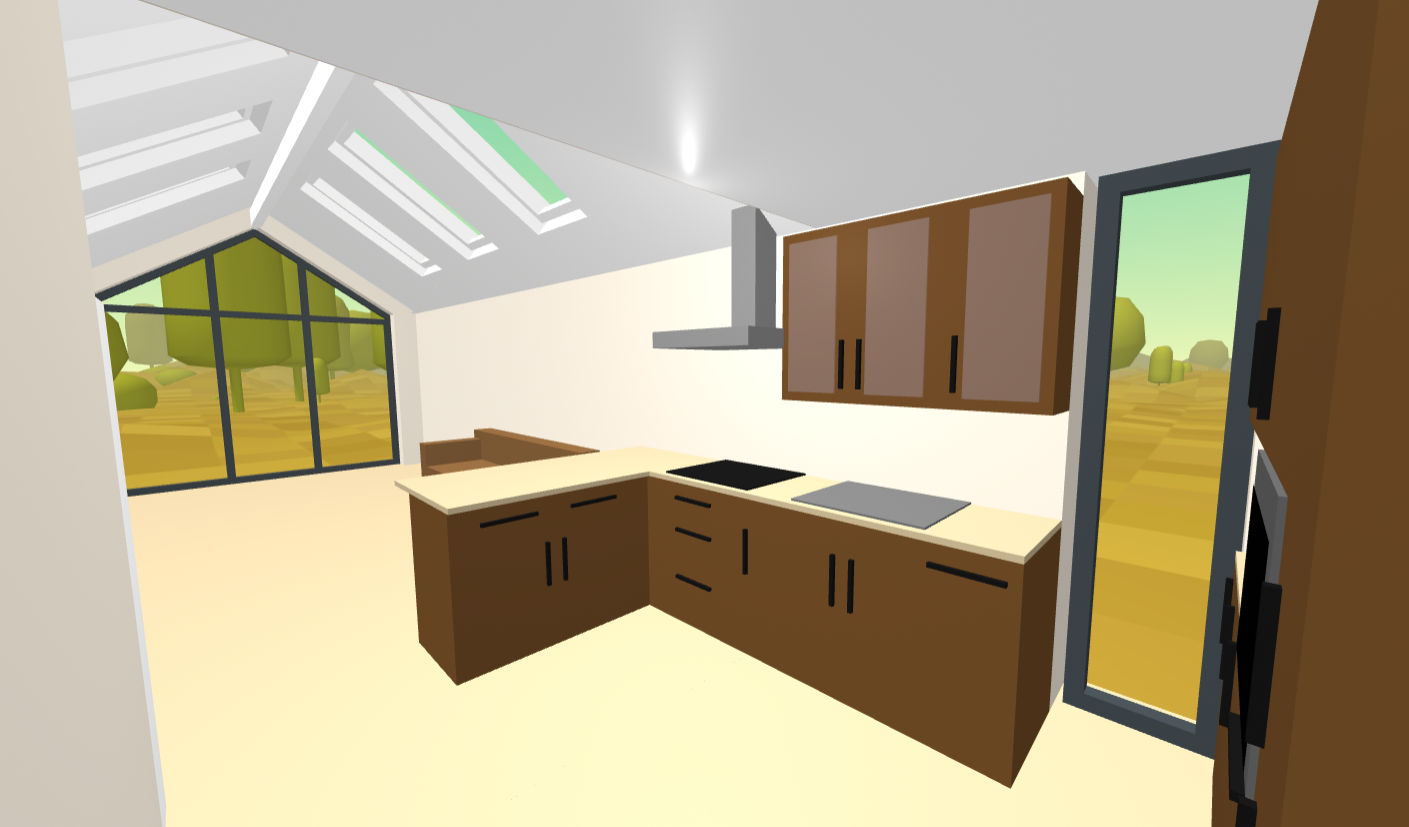
| VR Walkthough of an annexe extension, which I created from architects drawings in 2025. This was the inspiration for VR Walkthroughs in SimpleDraw |
Even with a background in VR development and 3D modelling, each of these models took me an hour or two to create, with lots of tedious measuring, cross-referencing of floor plans, and so on. It was well worth-it, but I wanted to find a way to achieve the same thing with a lot less effort. With the VR Walkthrough capability that I have now built into SimpleDraw, it takes just a single click to transform a 2D floor plan into a VR Walkthrough, which you can experience on your desktop PC, or in a VR headset.
If you are working on a renovation project, and you already have a VR headset (or if your children have one, and you can wrestle it off them for a few minutes!), I would say that it’s absolutely worth visualizing your room layouts in VR, before you go ahead and start making physical changes. And if you don’t have a VR headset, I would seriously consider getting hold of one for this exact purpose. These days, you can get hold of a second-hand Meta Quest 2 for around $100, and that’s more than sufficient.
If you have a VR Headset already, you can try out the VR Walkthrough yourself in our Public Gallery — no headset required, it works on desktop too. Take a look at the examples here.
And this an annexe extension that I modelled in 2025 (pictured above) — it includes a few features like custom window colours/shapes and cathedral ceilings that are on the SimpleDraw roadmap but not quite there yet. But it gives you a sense of where we’re headed. View VR Walkthrough.
SimpleDraw Plus
We’re now bringing all these features together into a single package.
SimpleDraw Plus is available for just $10 for a year’s access.
- Recreate an existing floor plan in minutes by tracing over an architect’s drawing, planning document, or real-estate brochure
- Walk through your room layouts in 3D on your desktop, or in full immersive VR on a headset
- Annotate your drawings with precise details — electrical layouts, fitted furniture dimensions, anything your contractors need to know
- Keep everything organised in Cloud Storage, accessible from any device, with version history and private sharing
These caapabiities allow you to understand and visualize the changes you are planning, and have a clear organized system to keep track of all your drawings. That means fewer misunderstandings, fewer surprises, and fewer expensive mistakes, throughout your renovation project.
If you want to know more:
- You can read more about the features of SimpleDraw Plus here
- You can try out the basic free drawing tools from SimpleDraw here. No subscriptions, no sign-up required.
- And you can test out our Image Tracing and VR Walkthrough capabilities with examples in our Public Gallery, for example this (image tracing) and these (VR)
Thanks for reading. As ever, if you have any feedback, or want to connect, you can always reach me on our Discord Server
Best wishes - and best of luck with your renovation project, whatever form it may take!
Diarmid